
Seasonal pricing: different tour prices for different dates
A season gives a date range prices of its own, such as a high-season and a low-season price. You add seasons and enter their prices under Tours → Seasons.
Two kinds of seasons
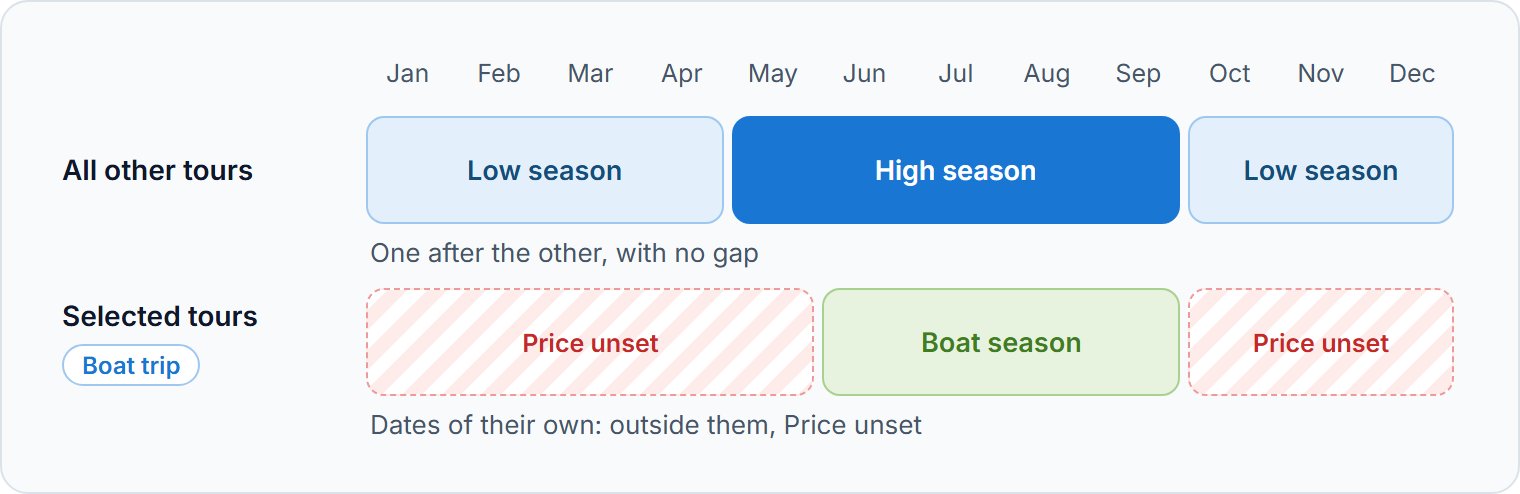
Each season applies either to all other tours or to the tours you select:
| Applies to | What it prices |
|---|---|
| All other tours | Every tour and add-on that no season for selected tours includes. These seasons follow one another, with no gap. |
| Selected tours | Only the tours and add-ons you pick, on dates of their own. |
Adding seasons
- 1
Add a season group
Click Add season group and choose what it Applies to.
- 2
Set its dates
Enter From and To. For Selected tours, also pick the Tours and Add-ons, then click Save.
- 3
Add the next season
Click Add season on the group. The new season starts the day after the group's last one ends: you set its end.
Entering a season's prices
Click a season to open its prices: one row per tour or variant, with a Private and a Group column. Enter the prices, then click Save at the top of the page.
- Base and Extra p/p: a price with a formula.
- Tiered and Edit: prices by party size, in a window that saves them itself.
- p/p: one price per person, on a group tour.
- Not using seasons: the tour or add-on sells at its own price.
Pick a number of passengers in Example price, at the top of the page: each price then shows what such a booking costs.
Price lists, agents and agencies
The list on the left starts with your prices for the public: General prices, or each of your price lists. Below come the agents and agencies with seasons of their own. Click Add agent to give an agent or an agency their own seasons and prices.
Questions we get asked
Yes. Turn off Apply seasonal pricing on the tour's Pricing, or in the add-on: it then sells at its own price on every date.
A new season for all other tours starts with the previous season's prices. A season for selected tours starts with each tour's prices from the last season that priced it.
Seasons for all other tours form one chain. Only the first and the last can be changed or removed, so no gap opens between them.
Yes, with an interval price adjustment: a percentage on top of the normal or seasonal price.
The agent's own seasons first, then their agency's, then General prices. Once an agent's seasons price a tour, a date they don't cover shows Price unset for that agent.