
Booking cut-off, confirmation and blocked dates for tours
Under Tours → Blocked Dates & Cut-Off you set, for all your tours: how late customers can book, which bookings you confirm yourself, and the dates tours can't be booked.
Booking rules
Booking rules has a card for private tours and one for group tours. Each change saves as you make it.
- Confirmation: Instant confirmation, Always manually confirm, or, on group tours, Manual only for new departures.
- Cut-off: Hours before start, By a set time (a time of day, some days before) or No same-day bookings.
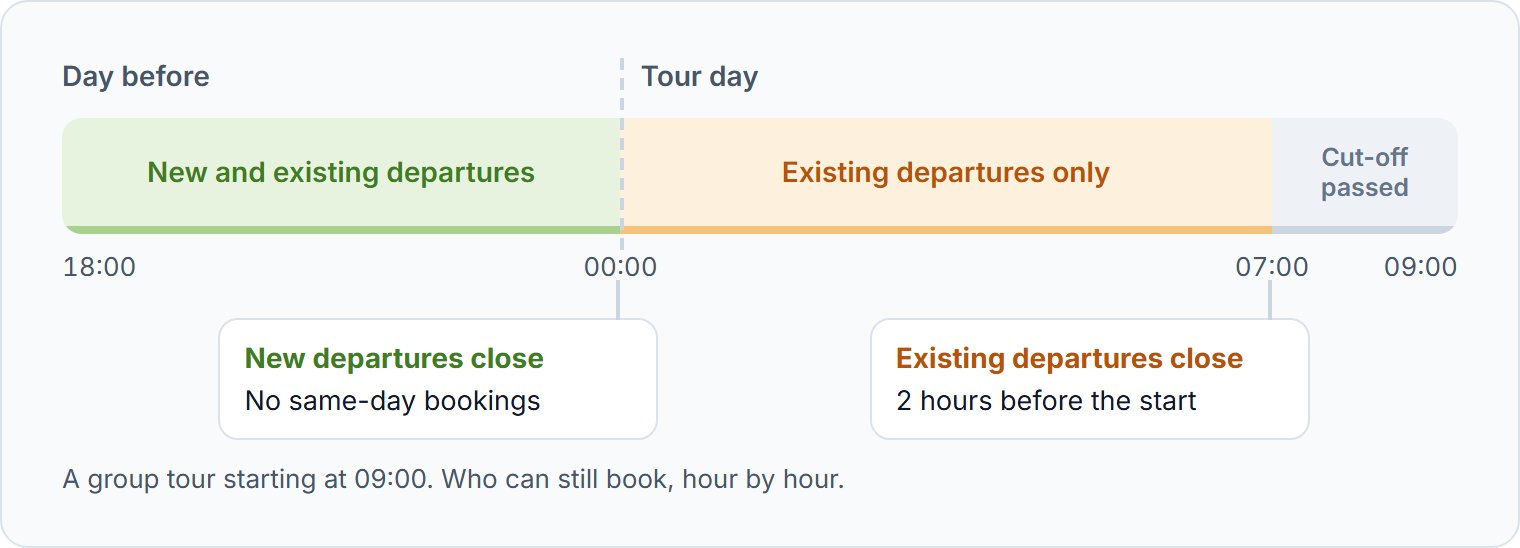
The cut-off is the last moment customers can book. Each card shows an example: for a tour at a given time, the moment booking closes.
Two cut-offs for group tours
A group tour has a cut-off for New departures, a booking that opens a departure, and one for Existing departures, a booking that joins a departure already scheduled. A new departure needs a guide and a vehicle, so it usually gets more notice.
After the cut-off
| Where | What happens |
|---|---|
| Your website | The booking comes in, but waits for your confirmation |
| Online travel agencies | The date can no longer be booked |
A booking from your website that waits for confirmation can't be paid yet. Open it and click Confirm or Decline, with Email the customer on to tell them.
A different rule for one tour
Open the tour under Tours → Manage, then Private tour → Booking rules or Group tour → Booking rules. Inherit business default follows this page; any other choice applies to that tour only.
Blocking dates
A date block stops bookings on the dates you choose, for all your tours or some of them.
- 1
Create the block
Click Create new date block and choose the Date range.
- 2
Choose the tours
Leave Applies to on All tours, or pick the tours.
- 3
Choose what it blocks
Private tours are always blocked. On your website, their bookings wait for your confirmation, unless you switch on Hard block on storefront. For group tours, choose Group tours allowed or Group tours blocked, then click Save.
Limiting private tours per day
To run no more than a set number of private tours a day, click Create new availability limitation. Choose the Date range, the Maximum daily tours allowed, and whether Private tours only or All tours count. On a day that reaches the limit, new private tours wait for your confirmation on your website, and can't be booked on OTAs.
Questions we get asked
It was made after the cut-off, on a blocked date, past a daily limit, or for a tour you confirm yourself. Open it and click Confirm or Decline.
No. Viator and GetYourGuide sell only tours with instant confirmation. Civitatis sells them on request: you accept or reject each booking. A longer cut-off is often the better choice.
Instant confirmation, No same-day bookings for private tours and new departures, and 2 hours before the start for existing departures.